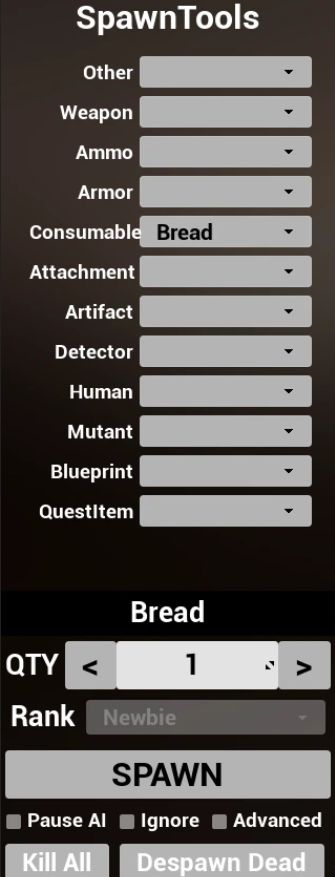
Spawn Tools
Spawn Mutants, NPCs, Weapons, Ammo, Artifacts and more. Also provides ability to Pause AI actions if you want to stage a custom encounter or scenario.
USAGE
Key Mappings
KEYBOARD
[ Backspace ] Open SpawnTools UI Window
[ Right Shift ] + [ Backspace ] Spawn last selected when UI window is closed
UI Options
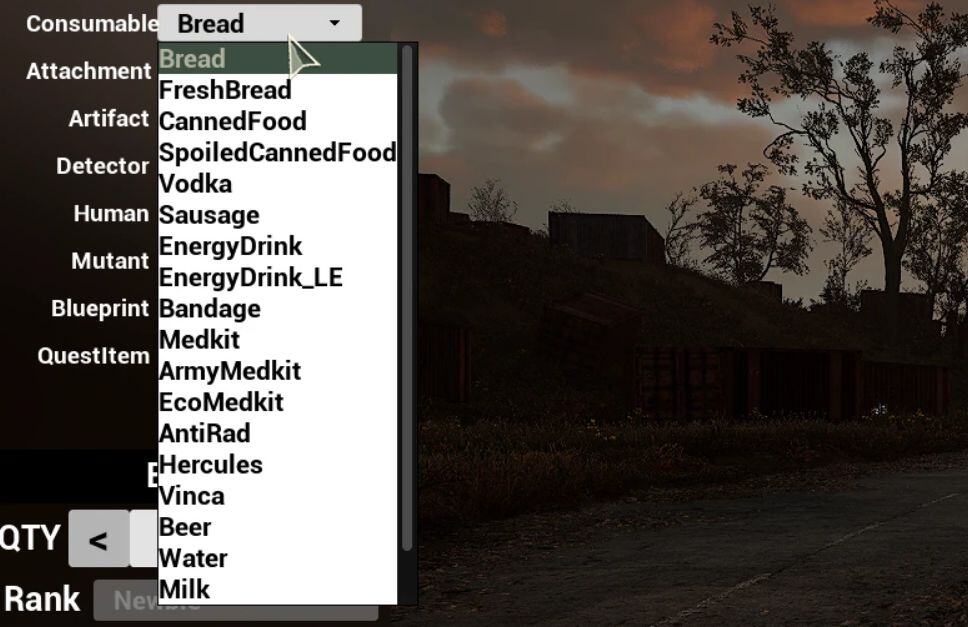
CATEGORIES:
Other – Mostly non-quest related keys and items
Weapon – Pistols, Shotguns, SMGs, Assault Rifles, Sniper Rifles, RPG and Gauss Rifles
Ammo – Weapon Ammo as well as Grenades
Armor – Helmets, Body Armor, Suits and Exoskeletons
Consumable – Food, Drink, Healthkits and Medicine
Attachment – Weapon Attachments such as Silencer, Suppressor, Magazines and Scopes
Artifact – Regular Artifacts and Arch-Artifacts
Detector – Anomaly Detectors such as Echo, Bear, Gilka and Veles
Human – Human NPCs such as Traders, Stalkers, Faction and Zombies
Mutant – Mutant NPCs such as Blinddogs, Bloodsuckers, Fleshs and Chimeras
Blueprint – Upgrade Blueprint USB sticks
QuestItem – Items specific to main and side quests. Such as Topaz Scanner, Quest PDAs and keys
* Note that picking up QuestItems will mean they will remain in your inventory until the quest is completed.
You will not be able to drop it without another mod such as Quest Items No More
SPAWN OPTIONS:
QTY – the quantity to spawn for a single request. Only enabled for certain categories.
RANK – The rank of the Human or Mutant to be spawned from Newbie (weakest) to Master (strongest)
SPAWN – Button which initiates the Spawn Request
Kill All – kills all non-protected Humans and Mutants within 100 meters
Despawn Dead – Removes dead bodies from the game within 100 meters
Pause AI – Disables the ability for Humans and Mutants to move and enter combat
Ignore – disables the ability for Humans (and some mutants) to attack the player with any non-melee attack ability
Advanced – show advanced AI Options (details in next section)
ADVANCED AI OPTIONS:
When any of the AI Options are toggled to True (checked), that AI feature will be disabled for all humans and creatures that subscribe to it.
These are features which provide stimulus that drives the AI decision making.
In Short — checking any of these features will disable said feature globally.
Tick – Override the ability for AI characters to change their AI state.
Update Decision – Prevents AI from changing state for any Decision-Based AI Actions
Threat – Can not perceive threats
Combat – Can not enter or remain in combat
Update Sensors – Bypass Vision, hearing, motion detection, etc.
Vision – Can not change AI state based on the available vision radius.
Hearing – Can not hear player footsteps or gunfire
Hit – Can not percieve being hit
Flare – Can not alert ally units to threat or changes
Emission Threat – Ignores the presence of an active or pending emmision
Sanity – Ignore Psy accumulation — should prevent humans becoming zombies but I have not verified this.
Movement Detection – similar to vision
ALife Director – ALife Driven Scenarios can not be spawned
Restricted Area – Mutants and Enemies ignore restricted areas such as Towns and bases
Wounded Weapon – Unsure
ALife Population – Bypass ALife population limits and despawn actions
See Player – disables vision and movement detection of the player
Flashlight Usage – prevents NPC Humans from using Flashlights.
VIDEO DEMO
INSTALLATION
Installation (Vortex)
1. Click the Vortex download button at the top of this page
2. When prompted by vortex, click the Install All option to install all 4 mod files.
Installation (Manual)
Installation (Simple ModLoader)
Install Simple ModLoader
Download Mod Files (Manual Download button at top of mod page)
Extract the 3 mod files (SpawnTools.pak, SpawnTools.ucas, SpawnTools.utoc) to your ~Mods folder
i.e → C:\Program Files (x86)\Steam\steamapps\common\S.T.A.L.K.E.R. 2 Heart of Chornobyl\Stalker2\Content\Paks\~Mods
Start Game
Press the tilde (~) key to enter the game console
Run the following command:
mod add /Game/Mods/SpawnTools/ModActor.ModActor_C
.
└── Stalker2
└── Content
└── Paks
└── ~mods
├──[+] SpawnTools.pak
├──[+] SpawnTools.ucas
└──[+] SpawnTools.utoc
Installation (UE4SS)
Install UE4SS
Download Mod Files (Manual Download button at top of mod page)
Extract the 3 mod files (SpawnTools.pak, SpawnTools.ucas, SpawnTools.utoc) to your LogicMods folder created by UE4SS
i.e → C:\Program Files (x86)\Steam\steamapps\common\S.T.A.L.K.E.R. 2 Heart of Chornobyl\Stalker2\Content\Paks\LogicMods
.
└── Stalker2
└── Content
└── Paks
└── LogicMods
├──[+] SpawnTools.pak
├──[+] SpawnTools.ucas
└──[+] SpawnTools.utoc